
Your website has a blind spot. It is most of your website.
PixyScan explores every page on a schedule and answers three questions: what is actually on your site, how ready it is for search engines and AI answer engines, and what your last release changed — from 100+ checks run over every page, every time.
500 URLs a month on the free plan. One site, all 100+ checks.
What it does
Three questions about your website, answered continuously
Not a report you run once and file. A crawl that repeats, so each answer stays true after the next release rather than describing a site you no longer have.
Understand
Know what is actually on your site
Most teams have never seen their site whole. PixyScan walks every reachable page and maps it: the structure, how deep each page sits, what links to what, which third-party domains you depend on, where redirects chain, and every dead end a visitor or a crawler can reach.
- Every page found, and how it was reached
- Internal link graph, orphan pages and click depth
- Third-party and outbound links, tracked over time
- 404s, redirect chains and loops
Be readable
Prove machines can read you
Search crawlers and answer engines read the HTML you serve, not the page a browser paints. Every page is scored for how well it can be parsed, understood and quoted — the structured data, the semantics, the head tags, the content signals AI engines actually key on.
- AI readiness scored per page (AEO and GEO)
- Structured data validated, not just detected
- Semantic HTML, headings and content signals
- The search fundamentals underneath it all
Catch
Find out the day a release breaks it
Every scan is compared against the last known-good one, so you get the four things that changed this week rather than the two hundred you already knew about. Wire it into CI and a release that would have broken something never reaches production at all.
- Scan-to-scan diff: new, resolved, still open
- Fail a build before the regression ships
- Scheduled re-crawls, per site and per branch
- Days to detection instead of quarters
Why this exists
Nothing breaks. That is the problem.
A deploy drops a title tag, flips a canonical, or ships a stray noindex. Nothing breaks. The page renders, the tests pass, and traffic decays quietly over the following weeks — so by the time anyone connects the loss to the release, the release is forty commits back.
Friday
The deploy goes out
A template change drops the canonical from every category page. Nothing throws. The build is green, the pages render, and the release notes say “copy tweaks”.
Six weeks
Traffic decays quietly
No alert fires, because nothing is broken. Impressions slide a few percent a week — inside the noise of any given day, obvious only in a quarter's chart.
Eventually
Somebody notices
By the time the loss is traced to a release, the release is forty commits back and nobody remembers what changed in it. The fix takes ten minutes. Finding it took a month.
The shift
An audit tells you the state of your site today. Monitoring tells you what changed since the last time it was fine — which is the only version of the question you can act on.
How it works
Five steps, and the fifth is the one that pays
Connecting a site takes a minute. Everything after the second scan is the product doing the watching so nobody on your team has to remember to.
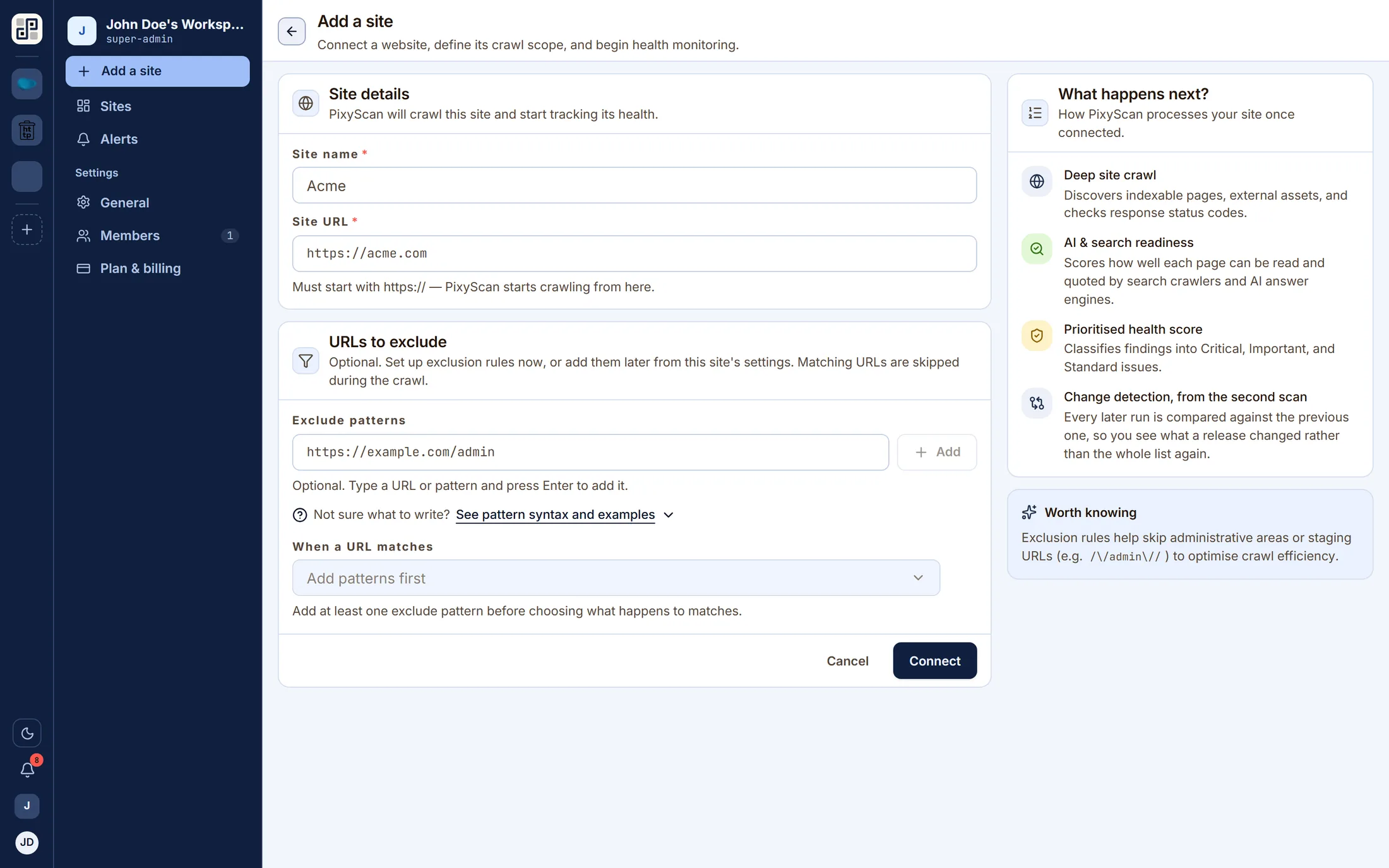
Connect a site
Paste a URL. The crawler reads robots.txt, follows the sitemap and walks the site from the homepage, respecting whatever exclusions you set.
Establish a baseline
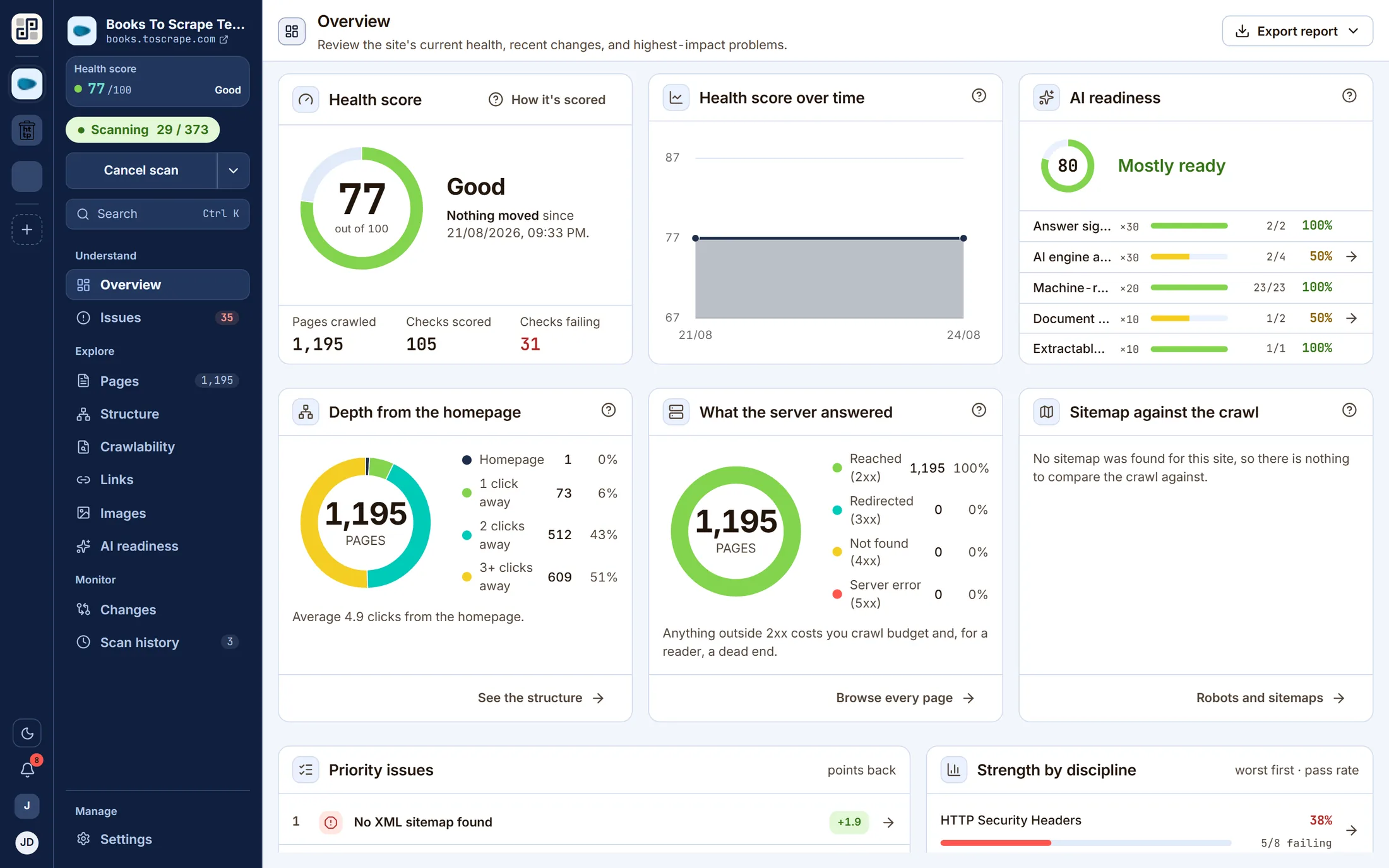
The first crawl catalogues every page and runs all 100+ checks. That run is the reference point — nothing is a regression until there is something to regress from.
Read what is wrong
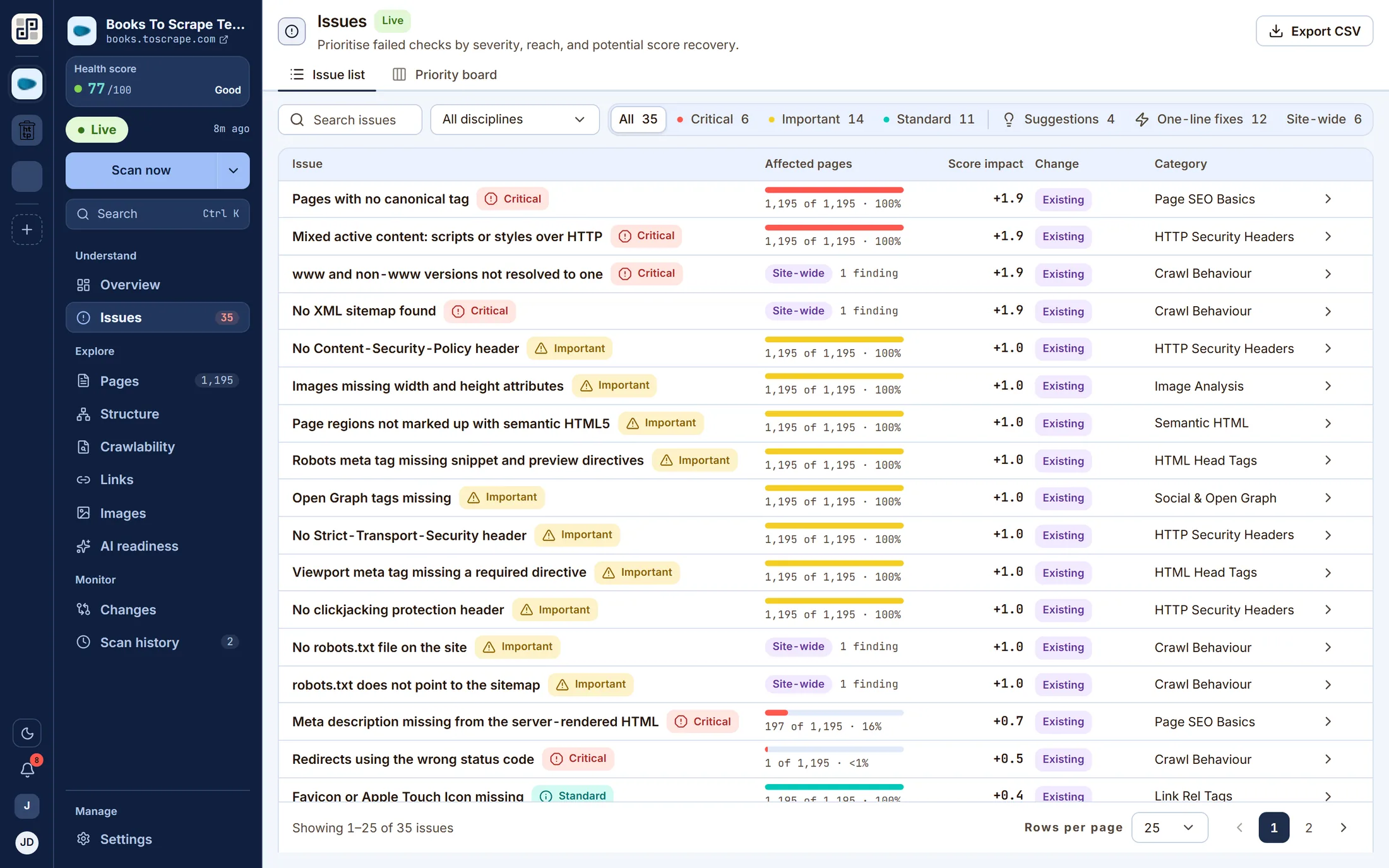
A health score out of 100, and a work list ranked by severity, reach and the points each fix returns. Every finding names the exact URLs it was found on.
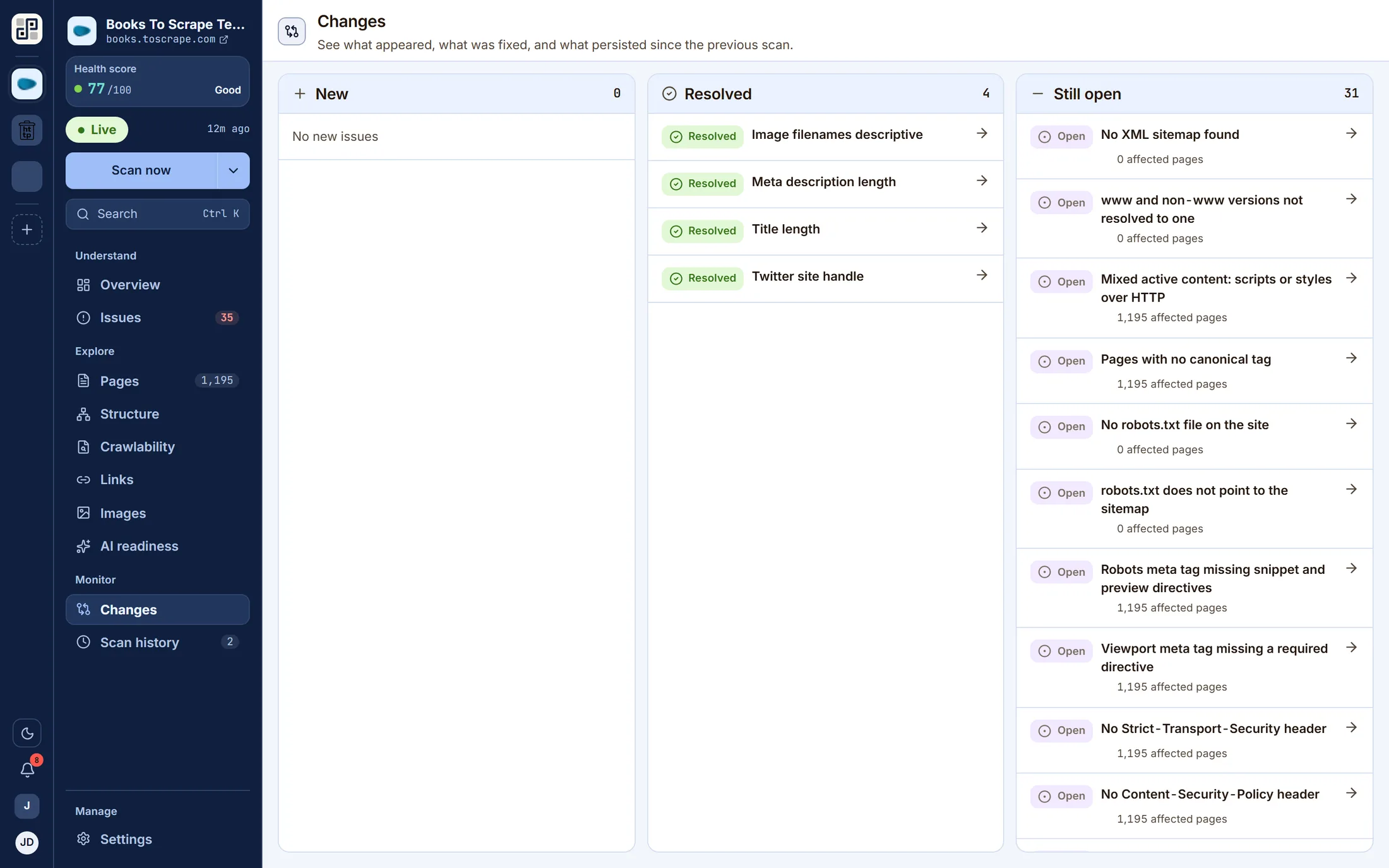
See what changed
Each scan is compared against the previous one on the same branch and split into new, resolved and still open. Two hundred findings you already knew about is noise; the four that appeared this week are the work.
Re-scan on a schedule
Daily, weekly or monthly per site, in your own timezone — or triggered from CI against a branch, so a preview deploy is measured before it ships and never becomes production's baseline.
The product
Eleven ways to read one crawl
A scan produces one dataset. These are the questions you can ask of it — every screen below is a capture of the running product, not a mockup.
Understand
Explore
Monitor
Manage
Overview
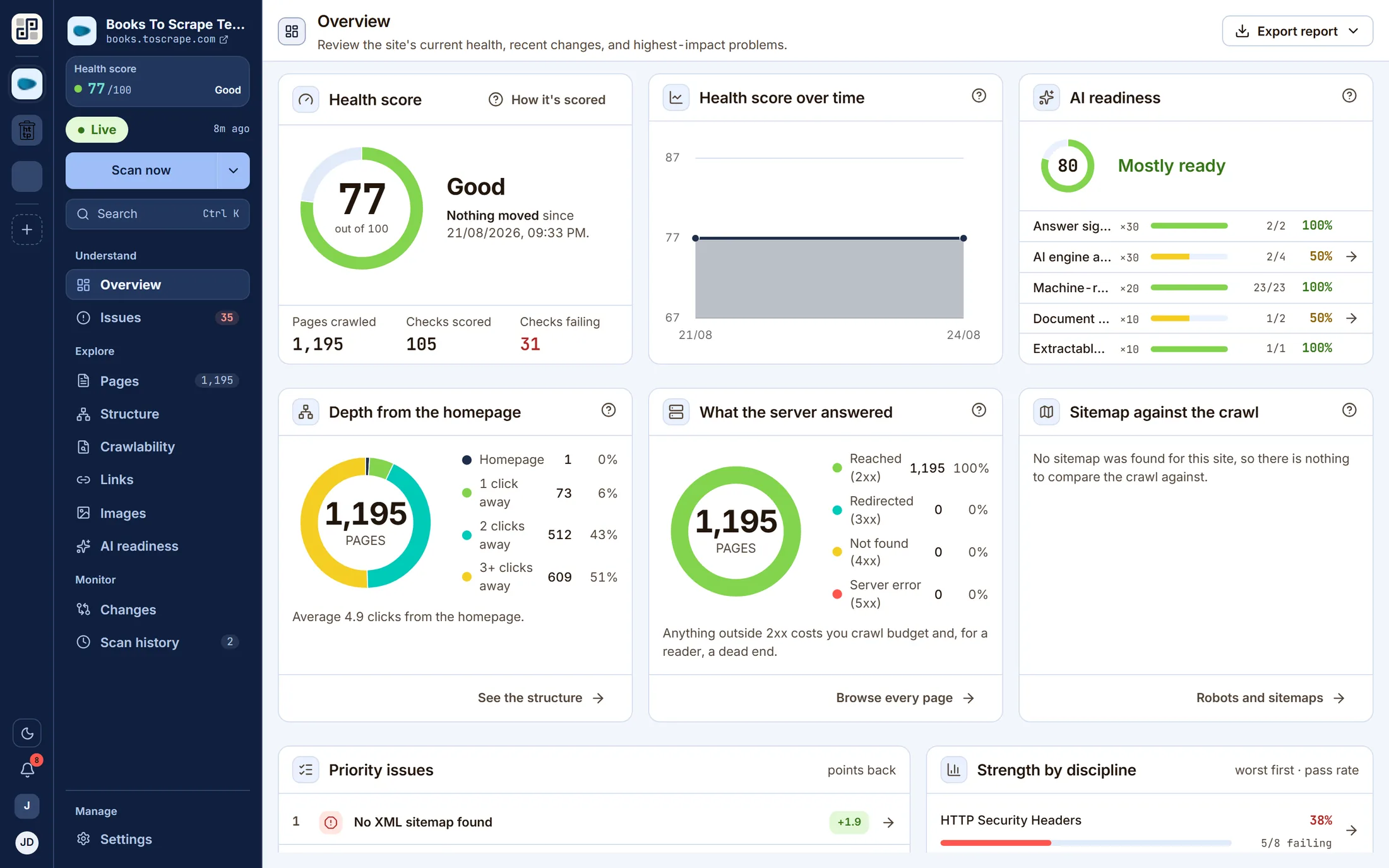
The site's current health score with its delta since the last run, what broke and what cleared, crawl depth, what the server answered, sitemap coverage and the highest-impact problems — on one screen.
Issues
Every failed check ranked by severity, by how many pages it reaches, and by the score you get back for fixing it. Filter to critical, to one-line fixes, or to site-wide problems, then export the list.
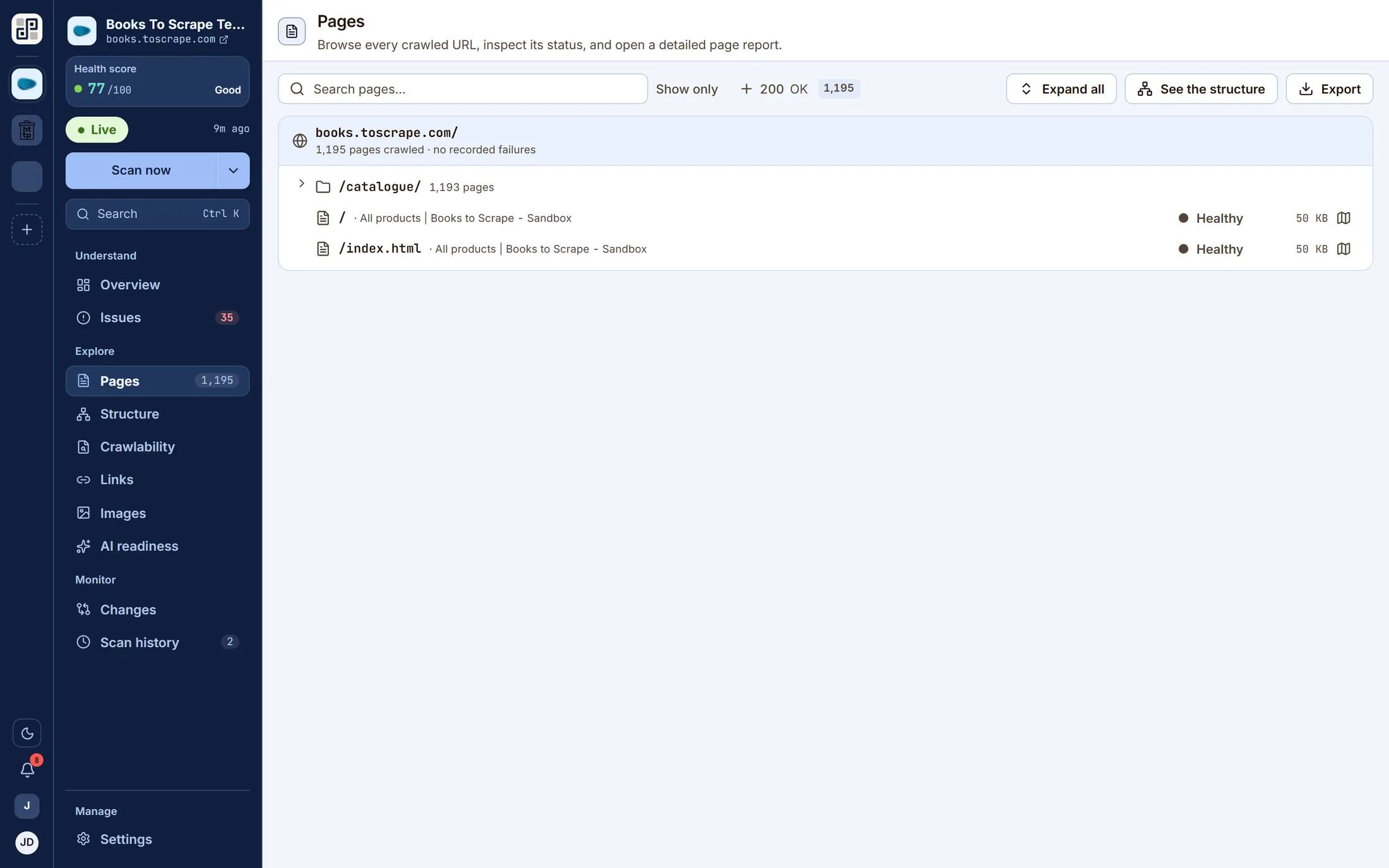
Pages
Every crawled URL with its status code, its findings and its depth from the homepage. Open any one for a full page report.
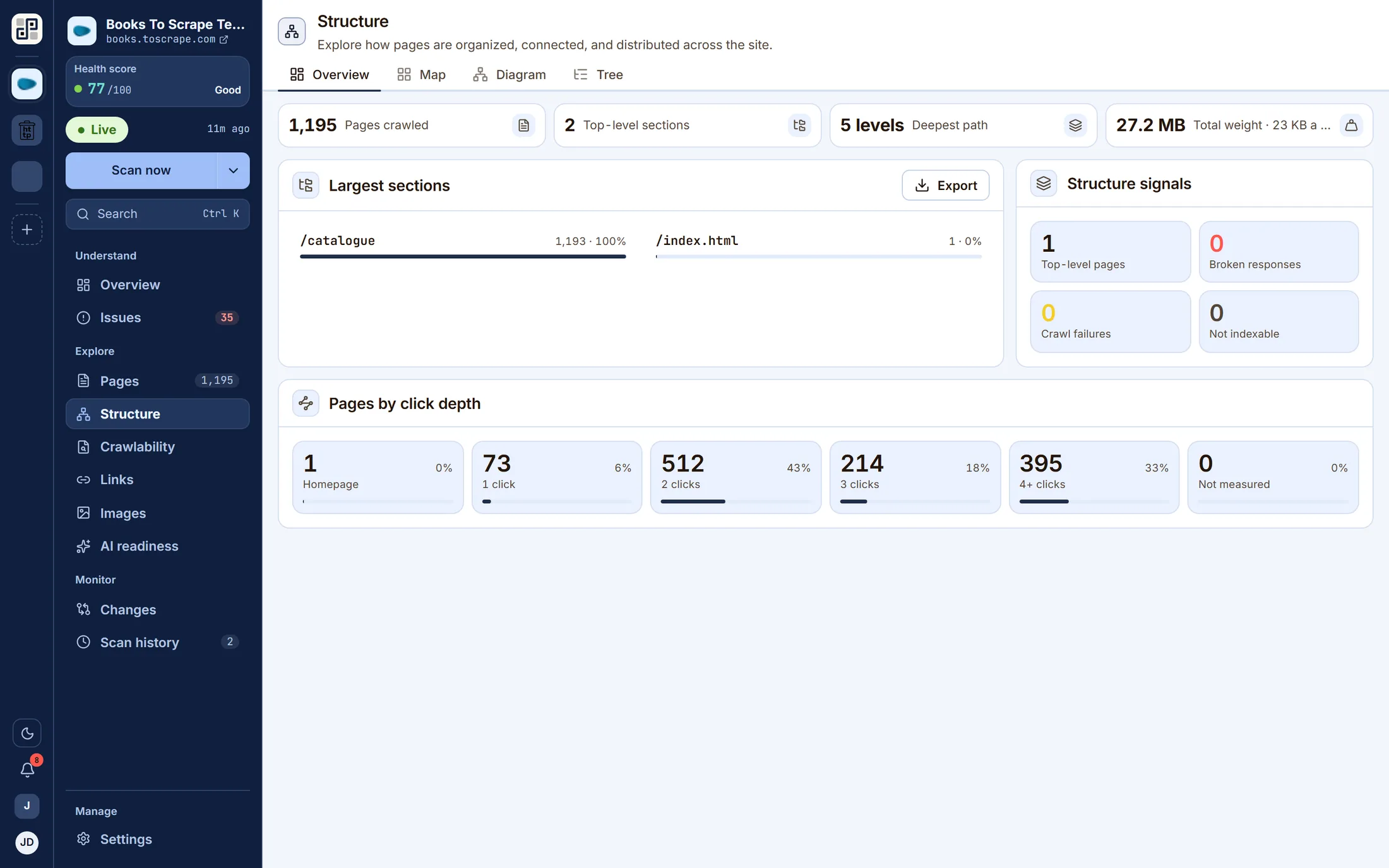
Structure
How the site is organised — pages, sections, depth and weight up front, then a treemap, a hierarchy diagram and a tree behind the tabs. Largest sections, click depth and structure signals on one screen.
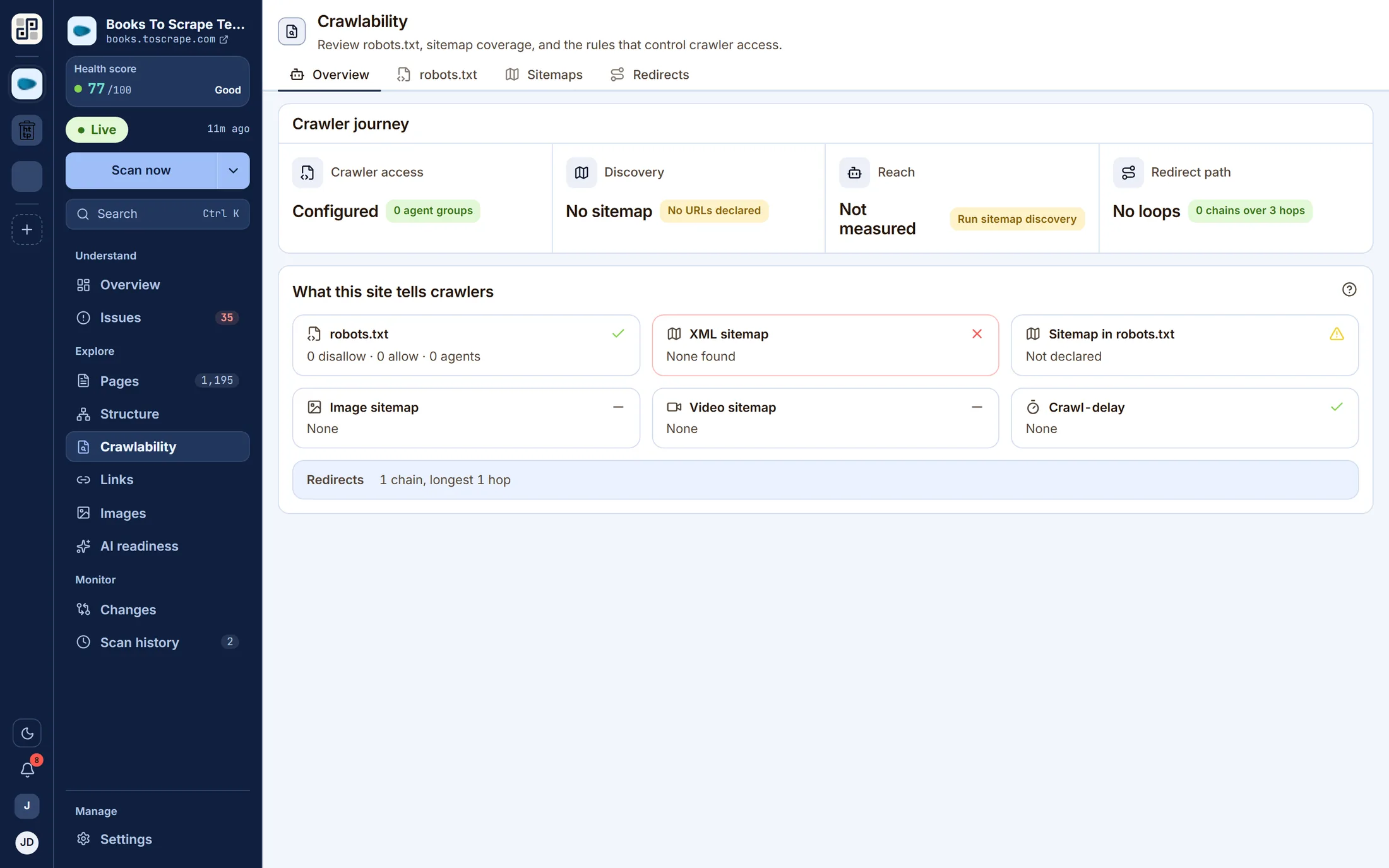
Crawlability
robots.txt and sitemap coverage read side by side, because they contradict each other constantly: a sitemap listing URLs that robots.txt disallows is invisible if you can only see one at a time.
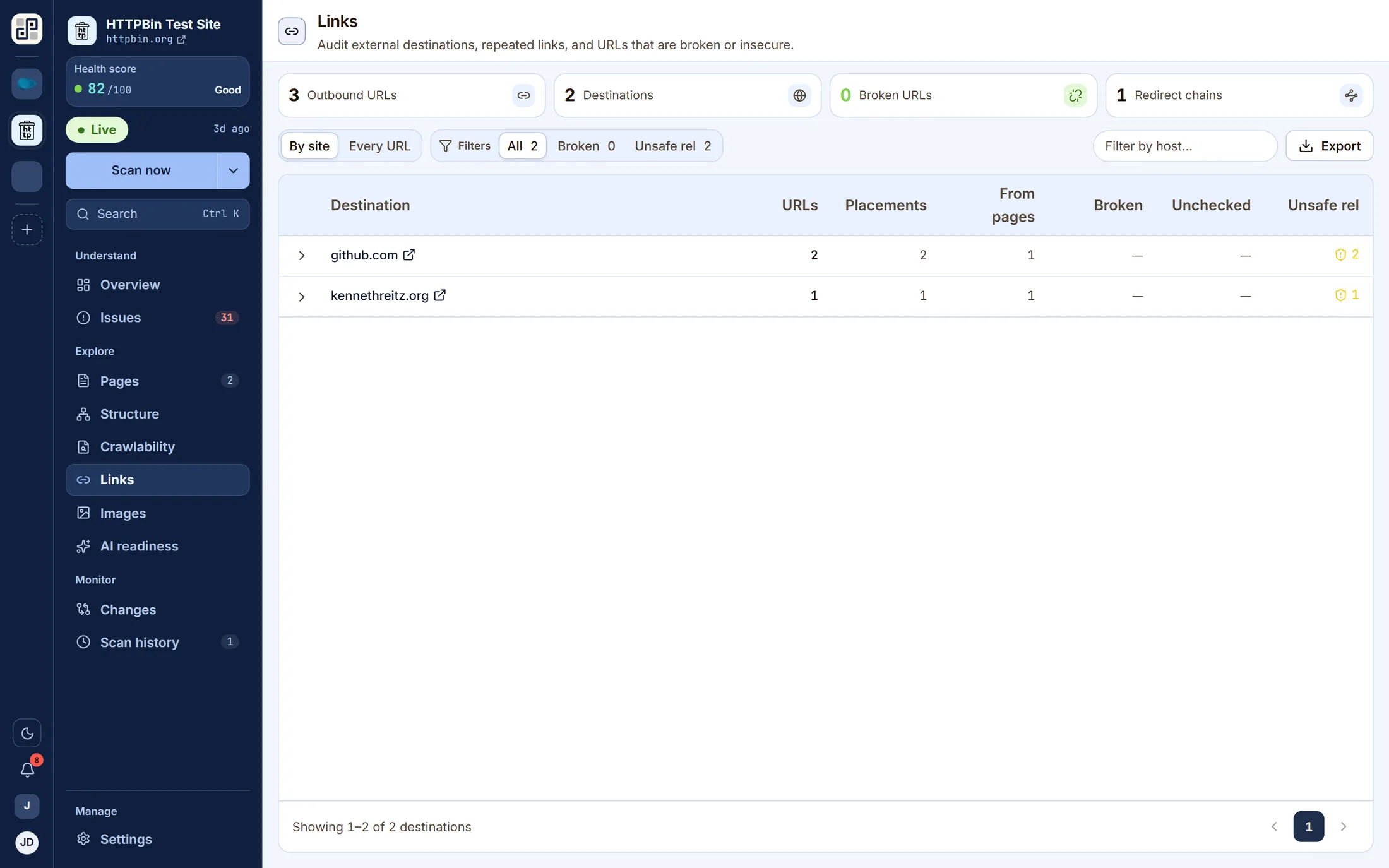
Links
External destinations, repeated links, and every URL that is broken or served insecurely — grouped by the site they point at, or listed one by one.
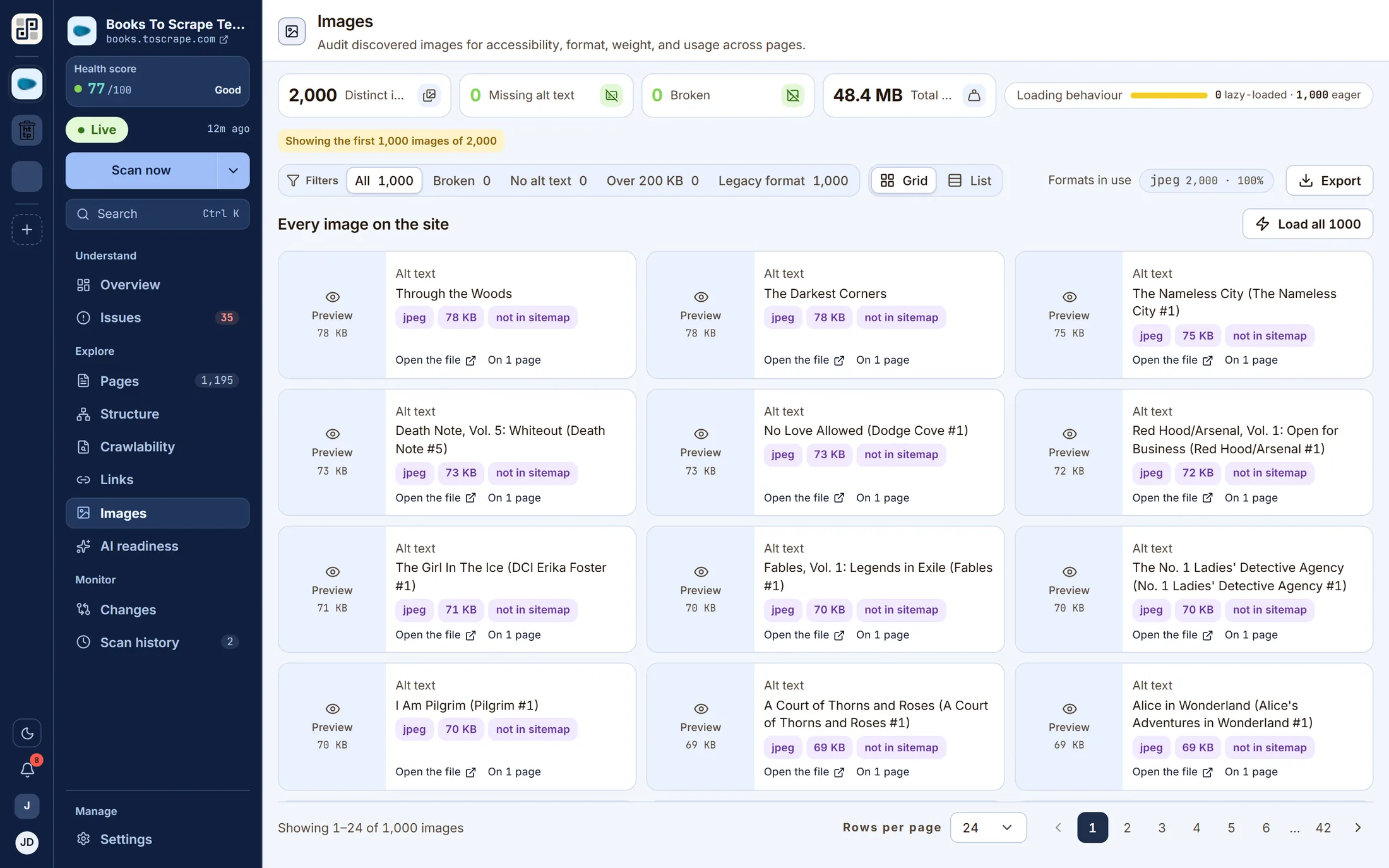
Images
Every discovered image audited for alt text, dimensions, format and weight, with the pages each one appears on.
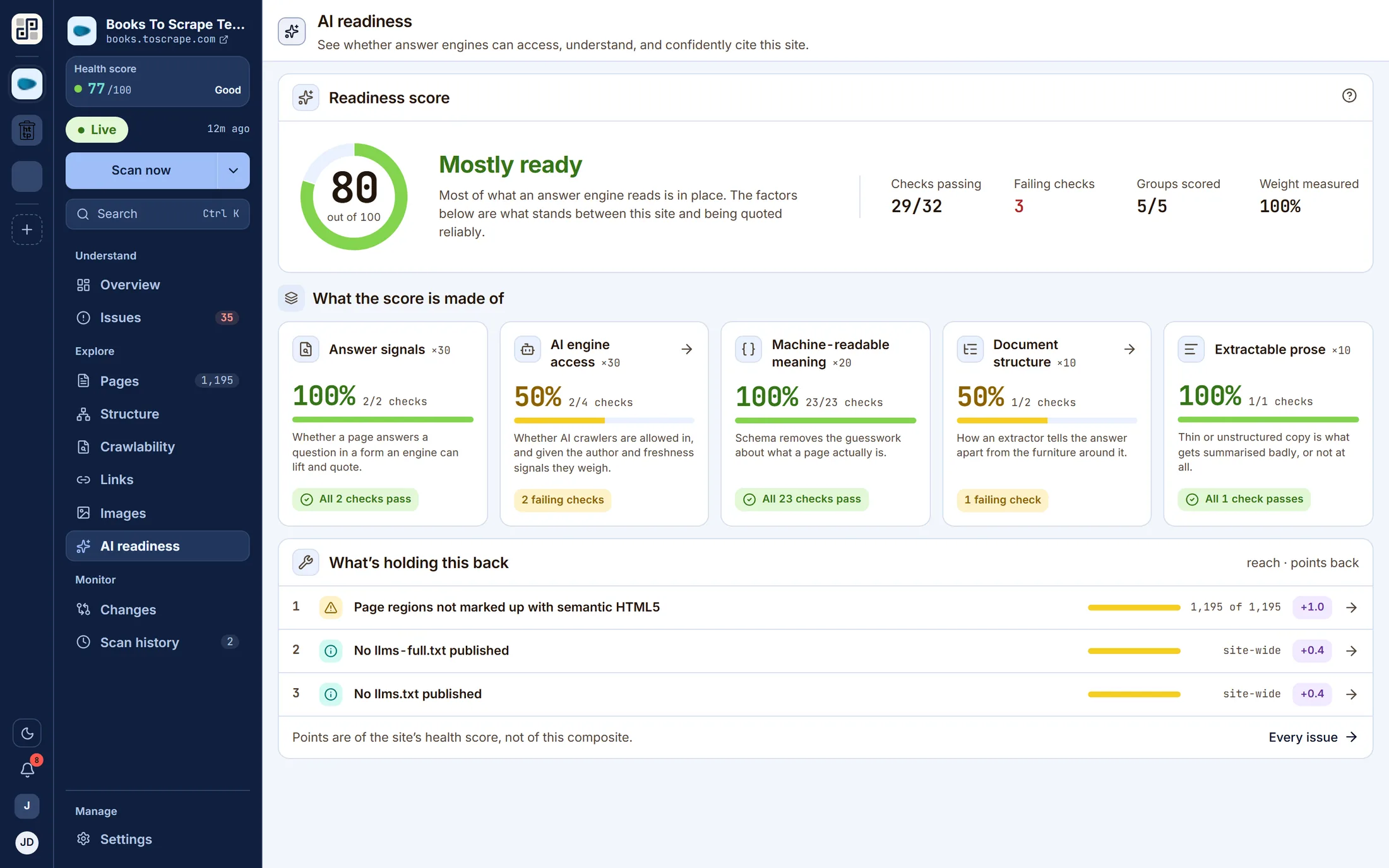
AI readiness
Whether answer engines can reach, parse and confidently cite the site — answer signals, AI engine access, machine-readable meaning, document structure and extractable prose, scored together and weighted.
Changes
What appeared, what was fixed and what persisted since the previous scan on the same branch. This is the screen the product exists for.
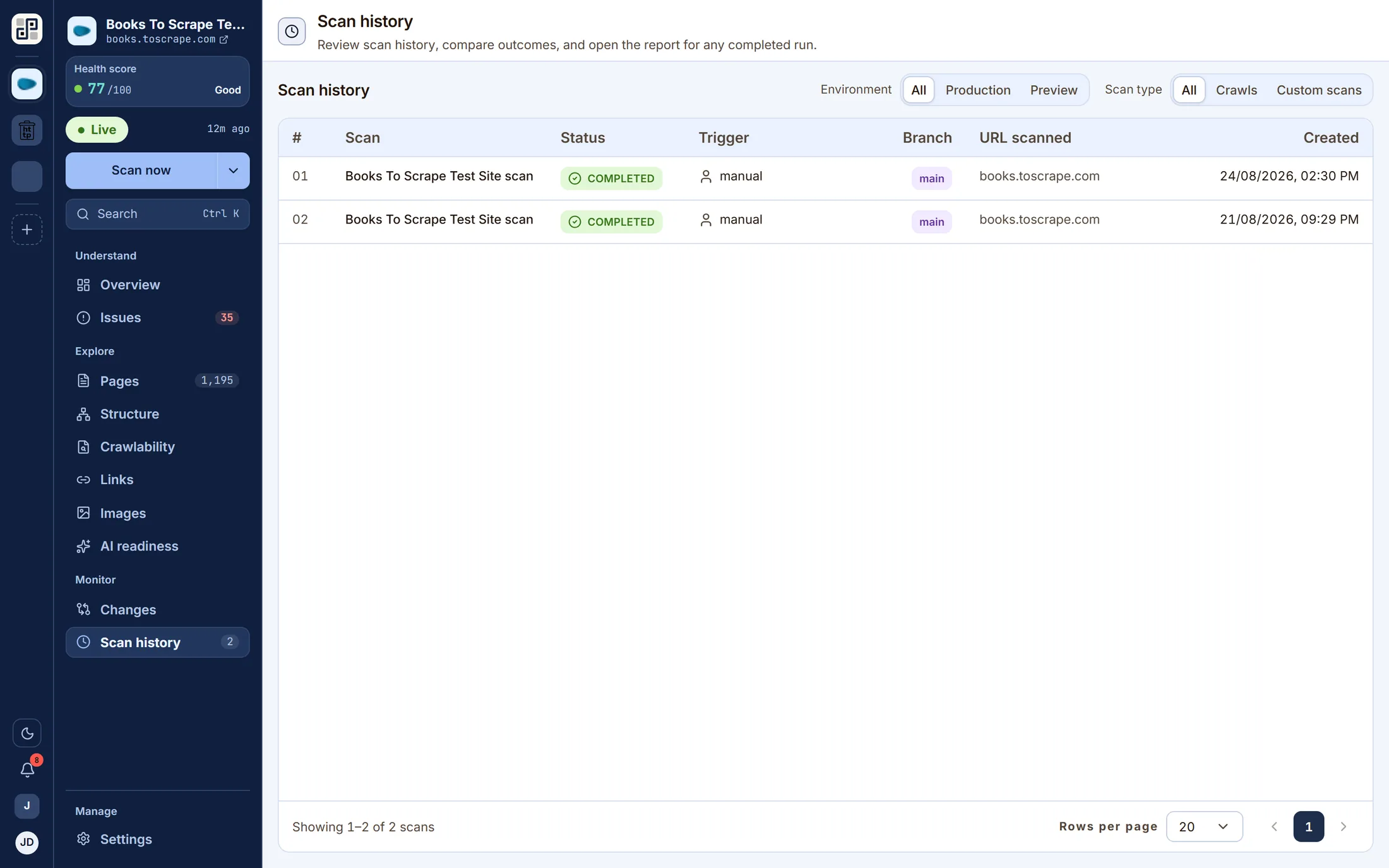
Scan history
Every run this site has ever had, with its score, its duration, the branch it measured and the report it produced. Open any one and read the site as it was that day.
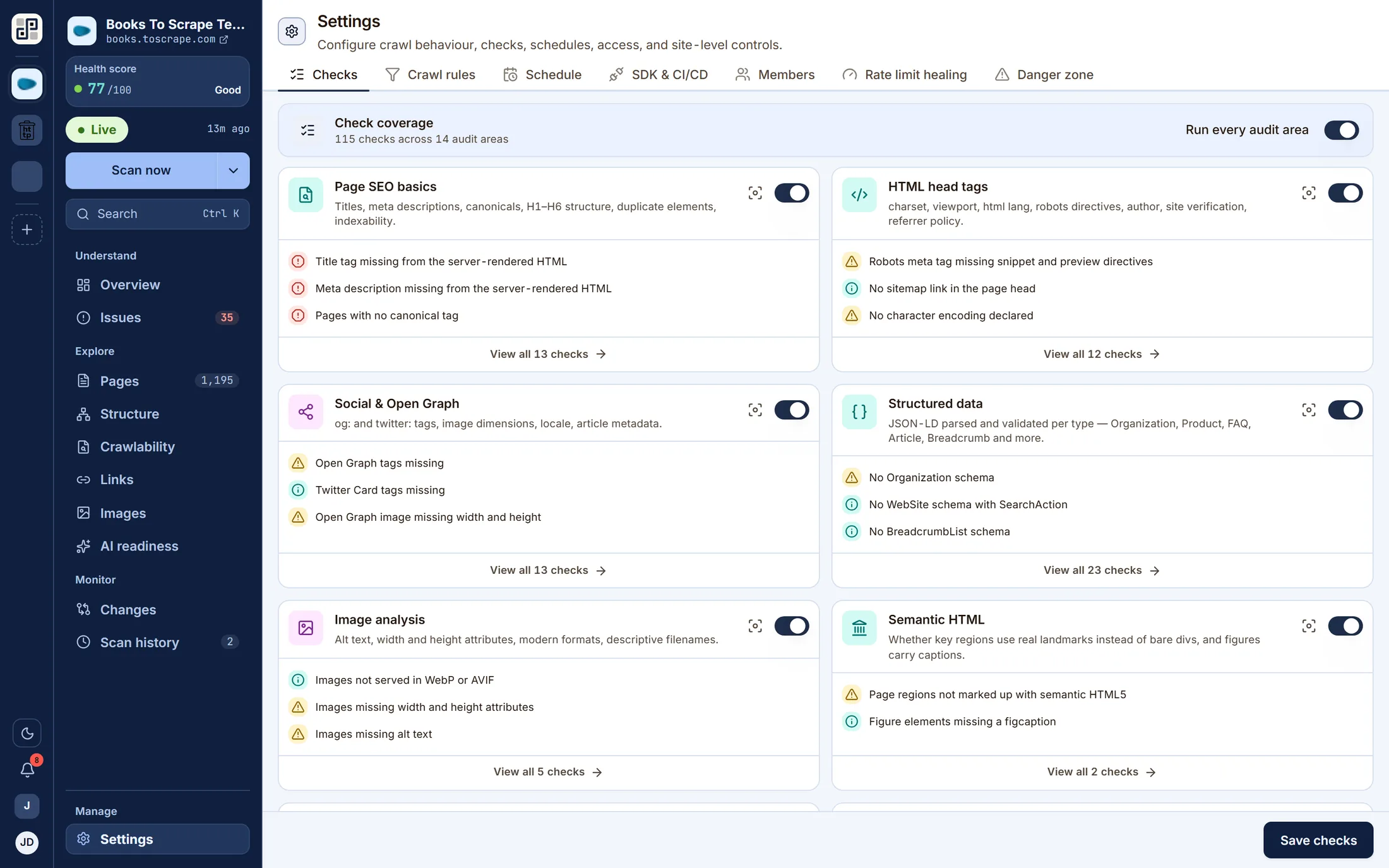
Settings
Turn individual check groups on or off, set crawl rules and exclusions, put the site on a schedule, issue a CI/CD secret, and manage who can see it.
100+
checks per page
across every audit discipline
14
audit disciplines
from crawl behaviour to AI readiness
11
lenses per site
overview, issues, structure, links and more
100
point health score
weighted by severity, with the arithmetic shown
How the 100+ checks are weighted
Severity is what the health score is weighted by. A missing canonical and a title three characters short are not the same problem, and are not scored as though they were.
- Critical
- Important
- Standard
- Suggestions
AI readiness
Answer engines read your site too
Search is no longer the only thing crawling you. PixyScan scores three things it can actually observe — whether AI crawlers are allowed in, whether your content is shaped to be quoted, and whether meaning is machine-readable.
Answer signals
A reading level measured against the audience the page is written for, and a comparison table on the pages that promise a comparison. An engine lifts a passage or it does not.
AEO Content Signals · 2 checks
AI engine access
Whether llms.txt and llms-full.txt are published, whether they follow the format, and whether they point at pages that still resolve. A file that lists dead URLs is worse than no file.
GEO & AI Engine Signals · 5 checks
Machine-readable meaning
JSON-LD parsed and validated per type — Organization, Product, FAQPage, Article, Breadcrumb and more — so a model reading the page finds structure rather than inferring it.
Structured Data & Rich Results · 23 checks
What it does not do: predict whether a model will cite you. It reports the signals under your control, and leaves the ranking to the engines.
What you get
Everything a crawl can tell you, and the fix beside it
Not a score with nothing behind it. Every finding names the URLs it was found on, and every check ships with a written guide to putting it right.
A health score with the arithmetic shown
One number out of 100, weighted by severity, with a per-discipline pass rate behind it and the exact points each unfixed check is costing you.
Every finding tied to exact URLs
Open any failed check to see every page that fails it and what was found on each one — never a percentage with nothing behind it.
A full report for any single page
One URL, everything recorded about it: title and meta with lengths, the heading outline, readability grade, internal and external links with anchor text and status codes, images, JSON-LD, security headers, hreflang and HTML head.
The fix, next to the problem
Each of the 100+ checks carries a written guide — what it is, why it matters, how to fix it, with examples — rendered inside the product beside the finding.
Branch-aware scans
Every scan records the branch it ran against and is only ever compared with the previous scan on the same branch, so a staging crawl never pollutes production's trend.
Fail the build on a bad release
A per-site secret, one CLI command, and an exit code. The scan runs against the branch's environment URL and returns pass or fail against the score threshold you set.
Export what you can see
The issue list, the pages failing one check, and a page's full report export to CSV. Any completed scan renders as a PDF — the problems, the strengths, or both.
Workspaces, sites and roles
Group sites into a workspace, invite the team, and give each person a role per workspace and per site. Invitations arrive by email.
In-app alerts
Scan started, finished or failed; score dropped; score below your threshold. They land on the bell and on the Alerts screen — in the product, not in your inbox.
The catalogue
100+ checks, across every discipline
Run all of them, or switch a discipline off per site — an image-free documentation site has no use for the image audit, and its score should not be dragged down by one.
Structured Data & Rich Results
JSON-LD parsed and validated per type — Organization, Product, FAQ, Article, Breadcrumb and more.
Crawl Behaviour
robots.txt, sitemaps, redirect chains and loops, broken internal links, orphan pages.
Page SEO Basics
Titles, meta descriptions, canonicals, H1–H6 structure, duplicate elements, indexability.
Social & Open Graph
og: and twitter: tags, image dimensions, locale, article metadata.
HTML Head Tags
charset, viewport, html lang, robots directives, author, site verification, referrer policy.
HTTP Security Headers
HTTPS and certificates, HSTS, CSP, Referrer-Policy, X-Frame-Options, mixed content.
GEO & AI Engine Signals
Whether llms.txt and llms-full.txt are published, follow the format, and point at pages that resolve.
Image Analysis
Alt text, width and height attributes, modern formats, descriptive filenames.
International SEO
hreflang pairs, x-default, self-referencing tags, RTL direction, per-language URLs.
Link Rel Tags
Favicons, apple-touch-icon, RSS feeds, manifest, AMP links.
URL Parameter Audit
Whether parameterised and faceted URLs are canonicalised, and canonicals stay clean.
AEO Content Signals
Reading level scored for answer engines rather than only for people, and whether a comparison page carries a comparison table.
Semantic HTML
Whether key regions use real landmarks instead of bare divs, and figures carry captions.
Content & Readability
Placeholder copy left in the page — the lorem ipsum that shipped by accident.
Every one of the 100+ checks has a written guide — what it is, why it matters, how to fix it — rendered inside the product beside the finding.
Browse the catalogueWalkthrough
Watch a site go from URL to work list
One crawl, end to end: connecting a site, the scan running, the findings it produces and the comparison against the run before it.
The screen recording is not published yet. Until it is, the still above is the real product mid-crawl, and every screen in the walkthrough is on the product page.
Run one yourselfConnect
Paste a URL, set the crawl limits, choose which disciplines to run.
- 2
Crawl
The crawler reads robots.txt, follows the sitemap and walks the site, streaming progress as it goes.
- 3
Read
A health score, a ranked work list, and a page report for every URL it found.
- 4
Compare
Scan again and the second run is a diff: new, resolved, still open.
Pricing
Priced by what you crawl
One credit is one crawled URL. Every plan runs all 100+ checks — what changes with the plan is how much of the web you point them at, and how many people watch the result.
Free
One site, 500 URLs a month. Enough to see whether the product is for you.
$0/monthFree forever, no card
Start free- URL credits
- 500 / month
- Sites
- 1
- Seats
- 1
- History
- 30 days
- All 100+ checks
- Health score and work list
- Full page reports
- In-app alerts
- Scheduled scans
- Broken-link checking
Hobby
A real site, checked properly — scheduled scans, broken-link checks and history.
$19/monthBilled monthly
Choose Hobby- URL credits
- 2,000 / month
- Sites
- 2
- Seats
- 2
- History
- 180 days
- Everything in Free
- Scheduled scans
- Broken-link and image checking
- Scan-to-scan comparison
- SDK access
- CI/CD gating
- MCP
- Most teams
Basic
For a small team: more seats, more sites, CI/CD gating and MCP access.
$39/monthBilled monthly
Choose Basic- URL credits
- 5,000 / month
- Sites
- 5
- Seats
- 3
- History
- 1 year
- Everything in Hobby
- CI/CD scan gating
- MCP server access
- Two scans at once
- A year of history
- SSO
- Priority crawling
Pro
Everything, at production scale — SSO, priority crawling, two years of history.
$129/monthBilled monthly
Choose Pro- URL credits
- 10,000 / month
- Sites
- 20
- Seats
- 5
- History
- 2 years
- Everything in Basic
- SSO
- Priority crawling
- Five scans at once
- Two years of history
Need more than Pro, or limits set by contract? See the full comparison
Questions
The ones people actually ask
Including the two about features we have not built. A product page that answers those honestly is cheaper than a sales call that has to.
What is a URL credit?
One crawled URL. A scan that fetches 400 pages spends 400 credits from the month's allowance. Your plan's allowance is spent first, then any add-on credit you have bought, then anything support has granted — the billing screen in the product shows all three balances and what is left.
We already use Semrush or Ahrefs. Why this too?
Keep them. Those are research tools: they tell you what to go after. They will not tell you that last night's deploy dropped the canonical off your category pages. PixyScan watches the site you already have and reports what changed since it was last fine. Different job, works alongside.
How is this different from a one-off audit?
An audit is checking for smoke once a year. This is the smoke detector. A single audit gives you a list you will mostly already know; the value here starts with the second scan, because that is the first time a finding means something changed.
Does it measure page speed or Core Web Vitals?
No. PixyScan reads the HTML you serve — structure, links, markup and machine readability — not how fast a browser paints it. It does not run Lighthouse and does not report LCP, INP or CLS. Use PageSpeed Insights or your RUM provider for those.
Will it email me when something breaks?
Not yet, and we would rather say so. Scan events raise in-app alerts — scan failed, score dropped, score below your threshold — which appear on the bell and on the Alerts screen. Email delivery for those is the next thing on the list, not a shipped feature. Email today is used for signup codes, password resets, invitations and billing notices.
Can it stop a bad release from merging?
Partly, and here is the exact line. Each site can issue a client secret; `npx pixyscan-sdk run` scans the branch's environment URL and exits non-zero when the score falls below your threshold, which is enough for your pipeline to fail the build. What does not exist is a GitHub app that comments on the pull request or blocks the merge itself. Your pipeline makes that call.
How does it handle JavaScript-rendered pages?
PixyScan reads the server-rendered HTML, which is what a crawler sees first. That is deliberate — several checks exist precisely to catch metadata that only appears once JavaScript has run. If your title is injected client-side, PixyScan will tell you.
Can I scan a preview deploy without ruining my production trend?
Yes, that is what branches and environments are for. A scan records the branch it ran against and is only ever compared with the previous scan on the same branch. Map a branch pattern to a URL under Settings → SDK & CI/CD, and a preview run is filed as `preview` rather than becoming production's baseline.
What does AI readiness actually measure?
Five weighted groups, all of them things the crawler can actually see: answer signals (does the page answer a question in a liftable form), AI engine access (llms.txt and llms-full.txt, and the author and freshness signals engines weigh), machine-readable meaning (JSON-LD valid for the type it claims), document structure, and extractable prose. It does not claim to predict whether a model will cite you.
What happens if I cancel?
Cancelling means one thing: the subscription stops auto-renewing. Every entitlement is honoured to the end of the period you have already paid for, there is no mid-cycle termination, and your data stays where it is. What there is not is a refund — a purchased period runs to its end and the payment for it is final. Downgrades are deferred to the end of the cycle for the same reason.
Connect one site. Leave it two weeks.
The first crawl runs all 100+ checks and gives you a baseline. The second one is where this earns its place — it tells you what changed. If nothing worth knowing turns up, you have lost an afternoon.
Free plan · 1 site · 500 URLs a month · all 100+ checks · no card