

Watch every client site from one place
Add each client's site, scan them all on a schedule and send reports with your own logo. Contractors and clients see only the sites you give them.
Does this sound familiar?
If this sounds like your week, read on. Below is how PixyScan helps.
- Manual audits for every client take days each month, and repeat last month's work.
- A client's developer breaks something, and you hear about it when traffic drops.
- Giving a freelancer one client's data means sharing the login to every client.
How PixyScan helps
How PixyScan helps
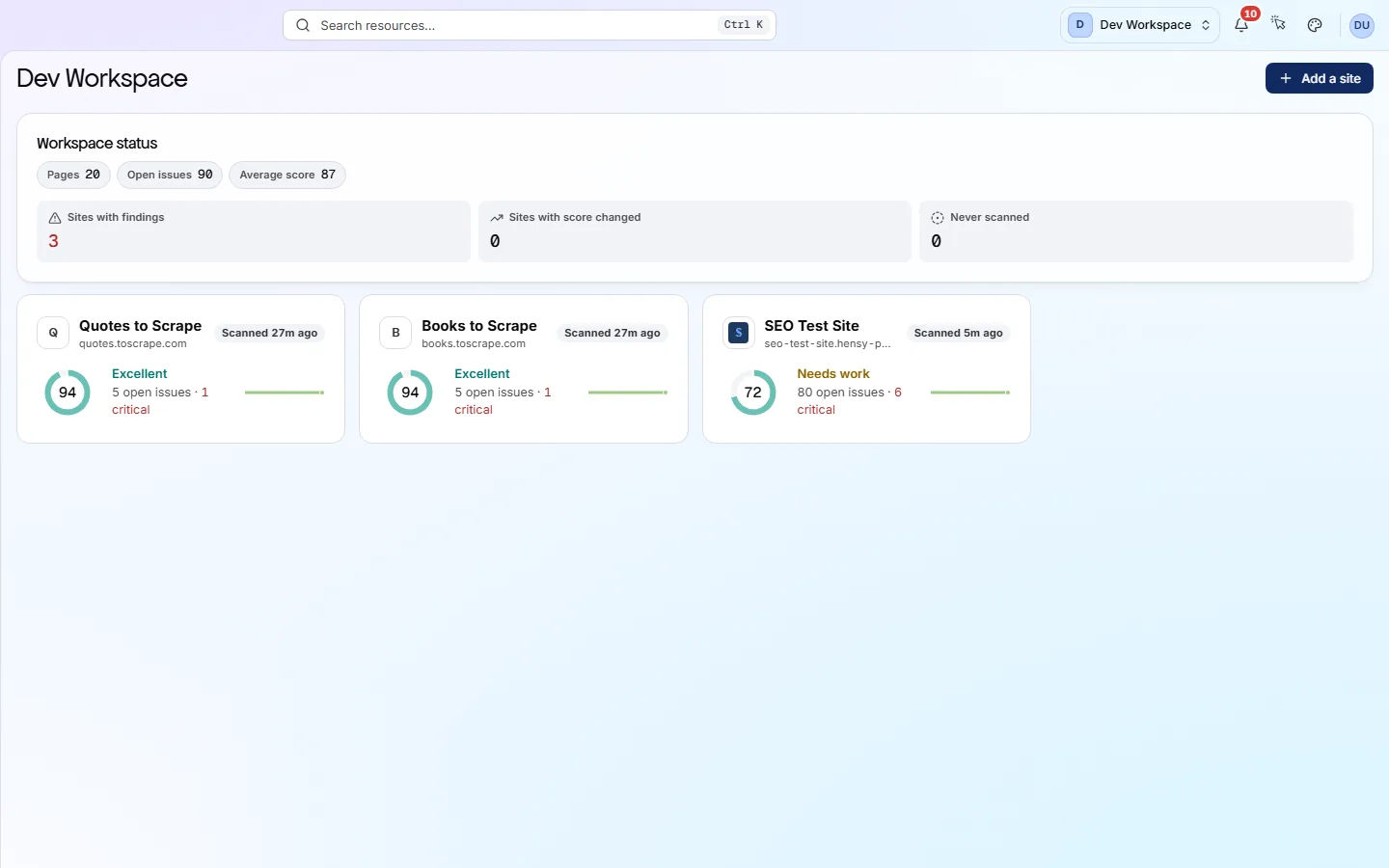
Each card is a real screen in the app: what you see there and what you do with it.
- 01
All clients in one workspace
The workspace Overview lists every client site with its health score, so you see who needs attention. A contractor invited to one site sees only that site.
- 02
Scans that run on their own
Give each site a daily, weekly or monthly schedule. Before a client call, open its Changes screen: what is new, what was fixed and what is still open.
- 03
Reports with your brand
Every tier can download a PDF report. From Pro up, add your logo and colours once. Agency mode removes the PixyScan mark, so the report reads as yours.
Getting started
Get started in 3 steps
- Step 1
Add each client as a site
Create a workspace for your agency and add each client's site. Invite contractors only to the sites they work on.
- Step 2
Put every site on a schedule
Give each site a daily, weekly or monthly scan. Before a client call, open its Changes screen to see what is new and what was fixed.
- Step 3
Send a branded report
From Pro up, add your logo, colours, cover and footer once under Reports. Every PDF you download then carries your brand.
Worth knowing
- Pro covers 25 sites and 10 people. Enterprise has no limit on either.
- All sites in a workspace share one monthly allowance of URL credits.
- Pro keeps two years of scan history, so you can show a client their progress.
- Reports download as PDF, CSV, XLSX, JSON or Markdown. Data exports start on Hobby.
What it doesn’t do
- Reports are not emailed to clients on a schedule. You download and send each one.
- No separate client portal. Invite a client as a Viewer (read-only) on their own site.
Start with Pro
Pro ($129 a month) suits most agencies, because it is the tier with white-label reports. It covers 25 sites, 10 people and 125,000 URL credits a month. Basic ($39 a month) suits up to 5 clients if PixyScan-branded reports are fine. Enterprise, priced by quote, removes the site and people limits.
FAQ
Questions you might have
How many client sites can I add?
2 on Hobby, 5 on Basic, 25 on Pro, and no limit on Enterprise. All sites in a workspace share one monthly allowance of URL credits, so allow for your biggest clients.
Can the report carry our logo?
Yes, from Pro up. Co-branded reports show your logo beside PixyScan's. Agency mode removes the PixyScan mark completely.
Can a client log in and see only their site?
Yes. Invite them as a Viewer on their own site. They can read it but not change it, and they see no other client.
Can each client have their own workspace?
Yes. Each workspace has its own subscription, people and URL credits, and you switch between them. Each account gets only one free workspace, so extra ones need a paid tier.
What happens if we run out of credits mid-month?
You can buy extra credits at any time: 1,000 for $9, 5,000 for $39 or 10,000 for $69. Bought credits do not expire at the end of the month.
Screens and features to explore
See what is wrong with your site
Add your site and get your score, your to-do list and a fix guide for every problem. Free for one site and 500 pages a month. No card, no time limit.
No card needed · Nothing to install · Cancel any time